Back to School 2026
The school office will be open from Monday, 19 January, 9.00am-3.00pm.
Wednesday, 28 January – Term 1 commences for all new students
- 9.00am-3.15pm
- Students need to bring their devices, packed lunches and water bottles. The tuckshop will NOT be open.
- Buses will be running.
Thursday, 29 January – Term 1 commences for all other returning students
- Atawhai – 8.45am
- Mihi Whakatau – 9.30am (parents and caregivers are welcome to attend – please note there is no parking on site).
- Students will not require their devices on Thursday, 29 January.
- School finishes at 3.15pm.
Beginning of the school day
Entrance to the school will be as follows:
- Students arriving by bus or walking, enter through the pedestrian gate by the traffic lights on Shakespeare Road.
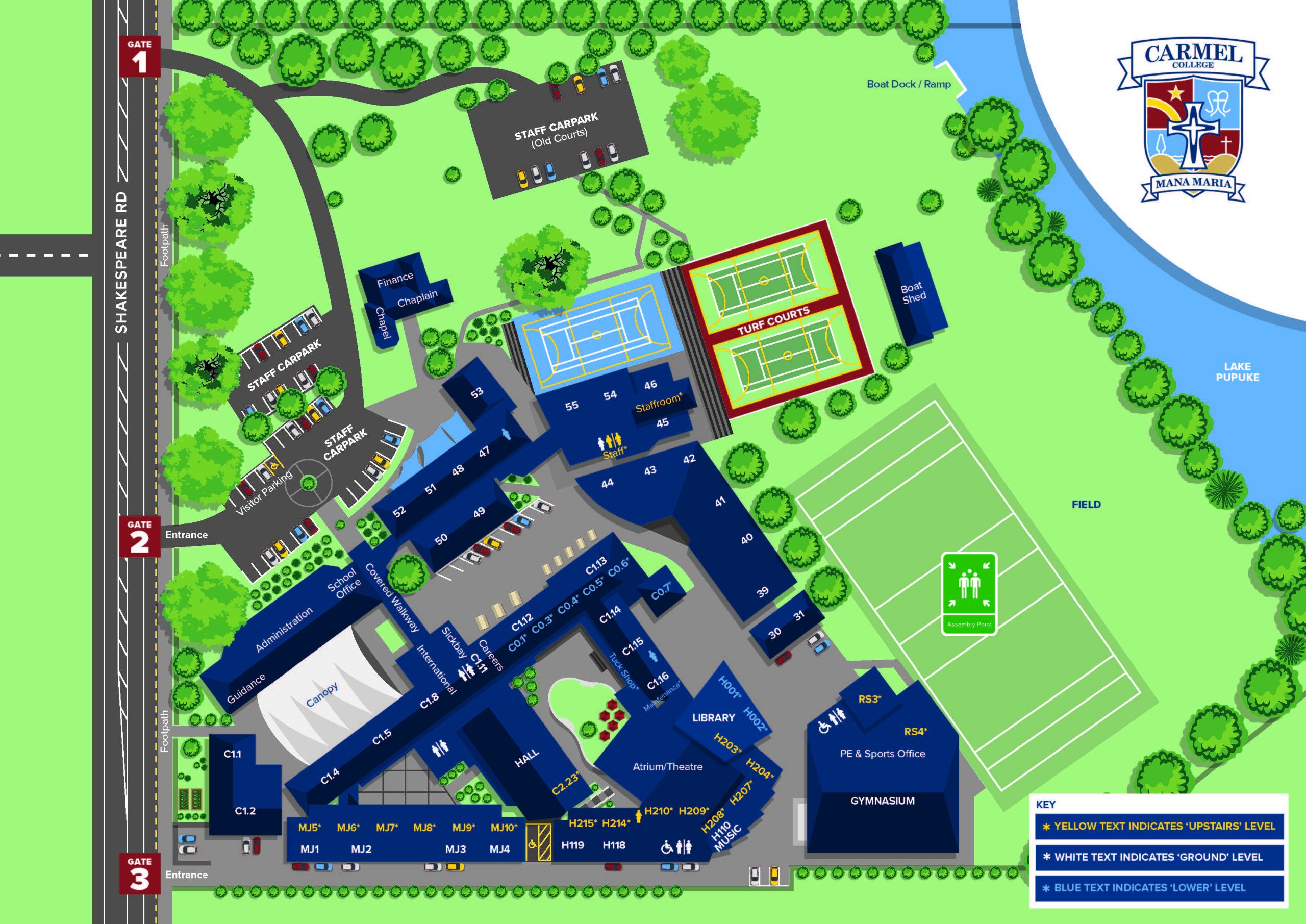
- Students being dropped off by car – parents, please drive in the main gate (Gate 2), let your daughter out of the car, then leave via Gate 1 (the gate closest to Milford). There will be Carmel staff directing the traffic flow and welcoming your daughter. COLLEGE MAP
End of the school day
- If you are picking your daughter up in the afternoon, please arrange a pick up location with your daughter, being respectful of the college neighbours’ property and driveways.
- Parents are not allowed on site to pick up students at 3.15pm at any time during the year.
- The school gates will be open from 8.30am each morning, then closed again at 3.00pm.
General Information
In the interest of student safety, parents are asked not to drive into the school grounds and drop off or pick up their daughters between 8-9 am or 3-3.45 pm. Students should enter the school through the gate by the Technology building. The main gates will be shut from 8.15 am until school starts and from 3.00-3.30 pm.
All visitors/parents please report to Reception when arriving at the school.
Contacts
If there are any issues to be discussed with the school, the first point of contact is your daughter’s Dean (new students will be advised of their House on the first day), followed by members of the Senior Leadership Team and then the Principal. As it may be difficult to phone during the school day, emailing is the recommended communication method. Please note that staff will endeavour to reply within 24 hours. Email contacts for all staff are found HERE
Uniform
UNIFORM requirements and information – the compulsory uniform items for all students are: blazer, skirt, cardigan, shirt and black leather lace-up shoes and ankle socks. Carmel PE top, shorts/leggings are also compulsory for students in Years 7-10. Optional uniform items are: rain jacket, sun hat, scarf and flat, plain, black sandals with a back strap e.g. Roman sandals.
Please note that full formal uniform will be required for photo day in Week 2. This includes blazer, opaque tights and leather shoes (either lace up or mary jane style).
All school uniform items can be purchased from our supplier, NZ UNIFORMS. Their retail shop is located at – 19A Douglas Alexander Parade, Rosedale.
Buses
School buses depart school from 3.15 pm onwards.
Bus timetables for Auckland transport and Party Bus can be found HERE
Parents, please check here before the first day of school to find out which bus your daughter should catch.
Lockers
All Year 7&8 students are required to have a locker and $15 will be added to student accounts to cover this cost. Lockers will be allocated to students at the beginning of Term 1 by their teacher.
Lockers are optional for Year 9-13 students and can be ordered via MyMonitor (the Carmel Shop) from 19 January 2026, students are able to select any locker that is available online.
This is a first come first serve approach.
Locker location will be recorded on your payment receipt which is emailed to you after your purchase.
Please note: students need to purchase their own padlock to secure their locker.
If you have any queries, please contact Lorna Bryce lbryce@carmel.school.nz
Lockers are the property of Carmel College and are assigned to students for their use for approved purposes only. Lockers may be subject to inspection periodically by school officials only. Security of a locker and its contents is the responsibility of the student assigned to the locker. It is recommended students do not keep valuables in their assigned locker.
Please note: Payment for a locker indicates that you accept these terms and conditions.
Digital Devices
For specifications and purchase offers, please click HERE
Stationery / Workbooks
Students need to purchase subject workbooks and stationery supplies.
STATIONERY AND WORKBOOK LISTS for 2026
Student ID Card
This is a compulsory annual purchase ($7.50) and this charge will be added to your daughter’s student account. Please note that should a replacement card costs $15.
Music
Music Department isite HERE.
Accessing essential school information
While your daughter is at Carmel, you will use three main platforms:
ParentPortal
SchoolBridge
MyMonitor for Finance and Payments
After accounts are set up, all platforms can be accessed through the SchoolBridge app.
Set up instructions and further information below.
ParentPortal
The ParentPortal provides parents and caregivers with access to school reports, timetables, live attendance, NCEA results, group information, and personal details. It is a key resource for staying engaged in your daughter’s education at Carmel.
The portal can be accessed by following this link Carmel Portal. Log in with your school account email address.
Please note new parents will be emailed a link in the new year with instructions for access.
Students also have their own username and password to access the portal; these details are sent to their school email address.
SchoolBridge
SchoolBridge is the school’s main platform, providing fast access to ParentPortal information and simple communication with the school via its mobile app.
Use SchoolBridge to report student absences, including early pick-ups and late arrivals.
SchoolBridge is accessed via this link- CarmelBridge. Enter your school account email address and click on the Request Magic Link button.
You can enter SchoolBridge either through the website or by downloading the app.
SchoolBridge allows parents to quickly switch between their children’s profiles to access:
Live attendance information
School reports, released termly
The school calendar, newsletters and other important information
Permission slips for trips and activities
MyMonitor for Fee payments, and the Carmel Shop
Bookings for teacher conferences
Courses and option selections
NCEA results
Please contact Sharlene ODonnell (sodonnell@carmel.school.nz) if you have any questions on how to access either the ParentPortal or SchoolBridge.
Finance and payments
Carmel College emails school fee invoices at the beginning of each term. Refer HERE for a breakdown of these costs.
Payments to the school can be made via MyMonitor, which supports both Carmel Fees Payments and the Carmel Online Shop. You can easily switch between the two within the platform.
All student account costs can be viewed and paid using the Carmel Fees Payments application.
Printing funds (loaded onto your Daughters ID print account) can also be found at the Carmel Fees Payments application. The “add value” button is for printing funds only.
Log into MyMonitor with your school account email address.
Please note new parents will receive an emailed link in the new year with instructions for access.
Purchases of the following items should be made using the Carmel Online Shop
- Sports registrations
- Lockers
- Workbooks (Y9-13)
- School merchandise
- Community donations
- School event bookings/tickets
- PTFA events
Note that parent permission forms for EOTC events (Education out of the classroom) are sent via Schoolbridge throughout the school year. Any costs for these events are automatically charged to your student account (accessed via Carmel Fees Payments application) for payment.
Term Dates 2026
Term 1 2026 – Wednesday 28 January (new students to Carmel only) / Thursday 29 January (returning students) to Friday 2 April
Term 2 2026 – Monday 20 April to Friday 3 July
Term 3 2026 – Monday 20 July to Friday 25 September
Term 4 2026 – Monday 12 October to Thursday 10 DecemberM